Replace DevOps Tool Sprawl With One Secure Platform
Ship faster. Spend less. Stay compliant. Tickets, code, docs, chat, and CI/CD — designed together, not bolted on. Self-hosted or cloud. One price. No surprises.
- Defense & Aerospace Ready — on-premise & air-gapped deployment for ITAR compliance
- No Tool Sprawl — project management + Git/SVN + CI/CD + wiki + chat
- Transparent Pricing — first 5 users free, then $6/user, all features included
Not ready for a trial? Talk to an engineer about on-prem & compliance →


Teams That Have Built Better Software With GForge


“We replaced four separate collaboration tools with GForge and cut our annual costs by 30%.”Bank of Montreal
Why Teams Switch to GForge
Managing Jira + Confluence + Bitbucket + Slack costs more than money — it costs time. GForge gives you everything in one place.
Escape Tool Sprawl
Stop paying for — and integrating — five different tools. Tickets, repos, wiki, chat, and CI/CD all work together natively. One login, one interface, one bill.
Deploy Your Way
SaaS, self-hosted, or fully air-gapped. You control where your data lives — built for regulated industries, classified programs, and teams with strict security requirements.
Predictable Pricing
$6/user/month. All features included. No surprise bills when you enable a new capability, no per-seat add-ons for premium features. First 5 users are always free.
One Platform, Every Discipline
Not tools stitched together with plugins — real products, built on the same tickets, the same data, the same login. Explore any of them in depth.
Ticketing
Notebook turns every ticket into a versioned design doc. Breakdown turns it into a live sub-task board. The analysis, the code, and the review never leave the ticket.
Explore Ticketing →Agile
Sprints, releases, and backlogs are built from the same tickets and boards you already use for everyday tracking — not a bolted-on planning tool with its own data to keep in sync.
Explore Agile →Version Control
Git and SVN, side by side. Comments post inline on the diff and land on the ticket automatically — code review without a second tool to check.
Explore Version Control →CI/CD
Point Jenkins at GForge once. Every build reports back to the ticket that triggered it and the project’s own build history — zero per-job setup.
Explore CI/CD →Wiki
Pages that pull in live tracker queries, burndown charts, and build status — documentation that updates itself instead of going stale.
Explore Wiki →Document Management
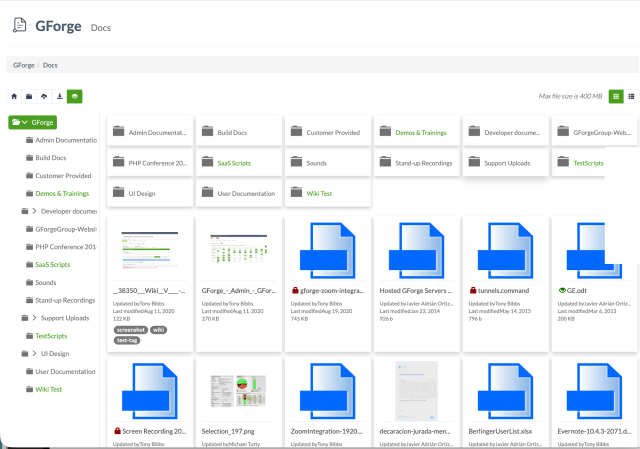
Project files live next to the tickets and code they’re actually about — versioned, locked against conflicting edits, and searchable by what’s inside them, not just the filename.
Explore Document Management →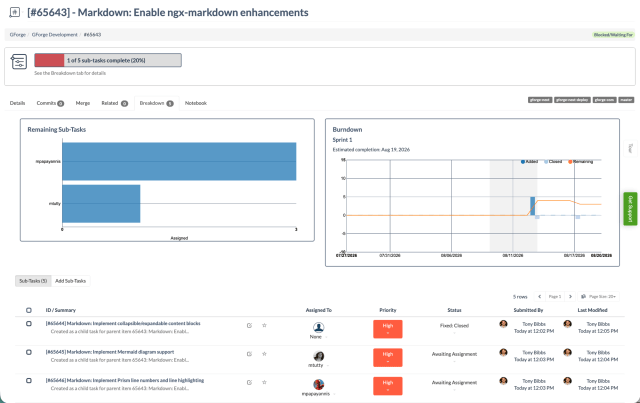


Point an AI at your project, not a blank prompt
Flow AI works inside GForge with a model and API key you provide. gforge-cli connects Claude Code, Cursor, or any MCP-compatible tool from your own machine. Either way, it’s working from your real tickets, wiki, and commit history — not starting from nothing.
- Reads and writes tickets, wiki pages, and sprints for real — not a read-only summary tool
- Off by default. Nothing runs until an administrator explicitly enables it, with your own model provider
- Attach it to a workflow transition and it runs automatically — a pre-review briefing before anyone opens the diff
- Runs authenticated as you — it can only see and touch what you already can

See How GForge Compares
Thinking about switching? Here’s what makes us different.
GForge vs Jira/Atlassian
Escape per-user add-on fees and complex administration. One platform instead of four.
Compare →GForge vs GitHub
Get real project management — not just issues bolted onto a code host.
Compare →GForge vs GitLab
Simpler, faster, lighter — without the resource overhead or complexity.
Compare →Simple, Transparent Pricing
No per-feature fees. No surprise add-ons. Just straightforward pricing that scales with your team.
Self-Hosted Free
Up to 5 active users
All features included
Ideal for smaller teams and organizations evaluating GForge. No time limits, no credit card required.
Self-Hosted Enterprise
Unlimited users
Air-gapped options, priority support
Tailored for large teams, R&D groups, universities, and public-sector organizations.
Starting at $6/user/month
First 5 users free
Public and private projects
Hosted by GForge. We handle infrastructure, updates, and backups. You focus on building.
Not Sure Where to Start?
Our 360 Assessment is a free conversation where we learn about your team’s workflow, identify gaps in your current toolchain, and show you exactly how GForge would fit — no pressure, no sales pitch. We’ll help you determine if GForge is the right solution before you invest any time in setup.
Ready to Simplify Your DevOps?
Join teams who’ve consolidated their toolchain with GForge.