Author: mtutty
Before You Adopt the Hot New Thing, Ask Why

A developer posted on Reddit last week asking if PostgreSQL with pgvector was “good enough” for their business directory chat app. They were worried. Should they use Qdrant instead? Pinecone? Weaviate? The directory might grow to hundreds of thousands of contacts someday, and they needed semantic search to work.
The question reveals something deeper than technical uncertainty. It shows how quickly we’ve learned to doubt our tools the moment something newer appears. PostgreSQL – a battle-tested database that powers half the internet – suddenly seems inadequate because vector databases exist and everyone’s talking about embeddings.
Here’s what the person was actually building: a chat interface where users ask things like “show me someone who does AC repair” or “find a digital marketing agency near me.” That’s not a vector database problem. That’s a natural language interface to structured data problem, and PostgreSQL handles every piece of it: geospatial queries for “near me,” full-text search for categories, JSON for flexible data, and yes, even vector embeddings if they turn out to be necessary.
The real work isn’t picking the right database. It’s geocoding your business listings, building a category taxonomy, understanding how users phrase requests, and deciding when semantic similarity actually matters versus when keyword matching is fine. None of that changes based on which database you choose.
Why We Keep Doing This
The pattern is everywhere. A new tool or architectural approach gets attention. It sounds smart. It is smart, in the right context. But the context gets lost in the noise, and suddenly it feels like everyone else is using it and you’re falling behind.
Vector databases are the latest example, but they won’t be the last. Ricardo Riferrei – who works for Redis, a company that sells a vector database – wrote recently about teams wasting months and hundreds of thousands of dollars implementing vector search for problems that didn’t need it. His framework for evaluating whether you actually need vectors includes questions like: Is exact matching insufficient? Can you tolerate approximate results? Can you afford embedding costs that might jump from $500 to $8,000 per month as you scale?
Most importantly: Is semantic search core to your competitive advantage, or are you solving a problem you don’t have with technology you don’t understand at costs you can’t afford?
Those questions apply to more than vector databases. They apply to every architectural decision, every tool adoption, every time you consider replacing something that works with something that sounds better.
The Questions That Matter
Before committing to the hot new thing – whether it’s an architectural pattern, a specialized database, or a platform that promises to solve everything – ask yourself:
What problem does this actually solve for us? Not theoretically. Not for someone else’s use case. For your specific situation, with your specific constraints, what concrete problem does this address? If you can’t articulate it in one sentence without hand-waving, you probably don’t have a clear answer.
Does our current solution actually fail, or does it just feel outdated? There’s a difference between “PostgreSQL can’t handle this” and “PostgreSQL seems boring compared to what everyone’s talking about.” One is a technical constraint. The other is FOMO.
Who bears the cost if this turns out to be wrong? If you’re advocating for a new approach but won’t be maintaining it in two years, that’s worth acknowledging. The person debugging embeddings at 3 AM when production is down – or migrating between vector model versions when OpenAI deprecates your embedding model – might have a different risk tolerance than the person who championed the technology.
Can we start with the simplest thing that might work? In the Reddit case, that’s probably PostgreSQL with full-text search and geospatial queries. Maybe add vector embeddings later if synonym matching turns out to matter. Maybe never. You can always add complexity when you’ve proven you need it. You can’t easily remove it once it’s woven into your architecture.
This Applies to Tools Too
The same pattern plays out with the tools we choose. Jira dominates not because it’s the best fit for most teams, but because it scaled for some high-profile companies and now everyone assumes they need it too. Teams adopt it, build workflows around its constraints, and then spend years paying the integration tax: context-switching between Jira for planning, GitHub for code review, Jenkins for deployment tracking, and Slack for everything in between.
And somewhere along the way, they stop asking if there’s a better option.
We build with integrated platforms all the time—we wouldn’t dream of managing a website with separate tools for HTTP routing, authentication, and database queries. But when it comes to project collaboration and software delivery, we’ve accepted that fragmentation is normal. It isn’t. It’s the result of momentum, not inevitability.
An integrated platform like GForge Next consolidates planning, code management, deployment tracking, and team communication in one place—not because integration is convenient, but because it’s how you avoid the hidden costs that best-of-breed approaches never quite account for. It’s the boring choice that works, the one that doesn’t require constant maintenance of the seams between tools.
Make Decisions Based on Problems, Not Trends
The vector database market believes that every search problem needs embeddings. The Kubernetes ecosystem believes that every deployment needs orchestration. The marketplace plugin model wants you to believe flexibility requires fragmentation.
Sometimes vectors are genuinely transformative, and Kubernetes is genuinely helpful. Sometimes a plugin marketplace is worth it.
But most of the time, the answer is simpler than the hype suggests. Most of the time, you don’t need the hot new thing. You need to understand your problem clearly enough to pick the right tool – which might be the one you already have.
The Reddit poster doesn’t need a vector database. They need to geocode their business listings and build a schema that supports how users actually search. The database is the least interesting part of that problem.
Your choice won’t be between PostgreSQL and Pinecone. It’ll be between adopting your third monitoring platform this year or fixing the observability gaps in the system you have. Between migrating to the latest framework everyone’s excited about or shipping the feature your users actually need. Between chasing what sounds prestigious and solving the problem in front of you.
Choose the latter. It’s not as exciting. But it’s honest work, and it tends to age better than the alternative.
SEO Excerpt (50 words)
Before adopting the hot new technology, ask what problem it actually solves for your specific situation. Most teams implement vector databases, specialized tools, and trendy architectures for problems they don’t have, with technology they don’t understand, at costs they can’t afford. The simplest solution often works best.
Keywords
- vector database selection
- PostgreSQL vs specialized databases
- avoiding technical FOMO
- pragmatic technology decisions
- tool selection framework
- database choice considerations
- integrated development platforms
- technology evaluation criteria
- avoiding tool sprawl
- right tool for the job
- questioning technology trends
- practical software architecture
- semantic search requirements
- technology hype cycle
- engineering pragmatism
Too In Love With the Idea?

I like meeting with early-stage founders as a technical consultant. It started a few years ago when I went through Venture School—a program run by the University of Iowa JPEC. I had an idea for a startup and spent eight weeks learning how to vet it properly: market segments, supply chain, financials, the Business Model Canvas. All the disciplined thinking I’d never done before.
What I learned over those eight weeks killed my idea several times.
Each week, I used what I’d learned to pivot, improve, or reshape it until it was viable again. That process taught me something I still come back to: the first, second, or third problem with a concept isn’t the end of the discussion. It’s the beginning of product development.
How About This?
Fast forward to this week. I met with two co-founders building a media-discovery app. Like Tinder, but for finding your next book or movie based on what you already like.
Cool, I said. Most “you might like” systems—Goodreads, Netflix, the rest—are better at recommending what they have in stock than what the user will actually enjoy. Late-stage capitalism meets less-than-motivated data science. Any idea that genuinely re-centers the user has my attention, so we were in violent agreement.
They had a slide deck, some mocks, and friends-and-family funding lined up. What they wanted from a technical partner was help figuring out how the AI and recommendation engine would work.
That is the product, I said.
TikTok isn’t compelling because of the videos. It’s compelling because it almost never suggests something you don’t want. It learns fast from misses. It connects seemingly unrelated interests across users and surfaces things you didn’t know you’d like. That’s the entire value proposition—and it’s also the hardest part to build.
What these founders had was a clear idea of the outcome they wanted. What they didn’t yet have was a plan for how the product actually gets there.
We ended the call on friendly terms. I’ve seen this moment enough times to recognize the pattern: the team is motivated, capable, and persistent—but persistent in a way that treats the idea as fixed and the execution as something that will sort itself out. In my experience, that’s usually the fork in the road where things get very expensive, very slowly.
The Hard Part
This isn’t really about technical skill. I see the same thing with non-technical founders and deeply technical ones.
It’s about falling in love with your idea.
Your big idea is probably not original. It’s also probably not where you’ll end up. And it’s almost certainly not the hard part. The hard part is the disciplined work of product development: market segmentation, competitive positioning, unit economics, customer acquisition, go-to-market strategy.
That’s why the Business Model Canvas exists. It forces you to examine an idea from every angle before you’ve spent two years building something nobody wants.
I recommend the Canvas to almost every founder I meet. Very few take me up on it.
Not because they’re lazy or unserious—but because being that critical of something you’re excited about is genuinely uncomfortable. It requires you to treat your idea as a hypothesis, not a belief. Most founders skip that step. And most of them pay for it later.
The parting advice I gave these founders was to spend a few weeks building real domain expertise. Talk through the problem space deeply. How do we categorize media? What’s already been tried? What technical approaches exist for recommendation systems, and what trade-offs do they make? Where do they fail?
Whether you use Claude or textbooks or interviews doesn’t really matter. What matters is developing a systematic roadmap to engineer the thing you imagine—or discovering that the thing you imagine isn’t quite what you should build.
They nodded politely. I hope they prove me wrong. But I’ve learned to trust that signal.
The Same Pattern, Different Domain
Later, it occurred to me that I see this exact same dynamic play out with teams choosing tools.
Someone falls in love with Cursor, or Slack, or the latest AI-powered development environment. The tool becomes the idea—the thing they’re excited about, the thing they evangelize, the thing they’ve already decided to adopt. The disciplined work of understanding their actual workflow gets skipped entirely.
How does work move from concept to shipped product? How do tasks flow from planning through development through deployment? Where does information get lost between systems? Where does ownership get fuzzy?
Those are product-development questions for your toolchain. Most teams never ask them.
Instead, they bolt shiny tools onto whatever they already have.
That’s how you end up with Jira for planning, GitHub for code, Slack for communication, Jenkins for builds—and no clear answer when something breaks at 2am. No single source of truth during a security review. No shared understanding of which system is authoritative when timelines slip or releases stall.
Nobody designed that workflow. It accreted, one tool-crush at a time.
Falling in Love With Shipping
We built GForge Next around a deliberately unsexy premise: the tool should disappear into the workflow, not become the workflow’s main character.
Integrated planning, code management, and deployment tracking aren’t flashy. They’re not meant to be. For teams that have moved past falling in love with tools and want to fall in love with shipping instead, that’s exactly the point.
If you’re ready to stop bolting systems together and start building product, give GForge Next a try. It’s free for small teams and open-source projects.
The GitLab Pricing Trap: Why “DevOps in One Tool” Costs More Than You Think

GitLab promises the dream: one platform for your entire DevOps workflow. No more juggling separate tools for version control, CI/CD, project management, and documentation.
It sounds perfect – until you see the invoice.
If you’re already comparing the two platforms, see our self-hosted GitLab alternative overview or the full GForge vs GitLab breakdown for a detailed feature-by-feature look.
The Reality Check
Your startup is growing. You’ve been happily using GitLab’s free tier, and now you’re ready to upgrade for those premium features that should streamline your workflow.
Then you hit the pricing page.
“GitLab ended up being a full order of magnitude more expensive [than alternatives]…”
At $99 per user per month for the Ultimate tier, that’s $1,188 per user, per year—almost $12,000 annually for a 10-person team.
By comparison: GForge Next SaaS costs starts at just $6 per user per month, with every feature unlocked from day one. No upsells, no “premium-only” buttons scattered across your UI.
The Collaboration Killer
GitLab’s user-based pricing doesn’t just hurt budgets—it stifles collaboration.
“At $1200/year there’s no way I’m letting the artists use Git. They can stick to their terrible Dropbox hacks.”
When inviting one more teammate means adding a four-figure bill, you start excluding people from the process:
- Designers can’t access repos.
- Product managers can’t use integrated planning tools.
- Cross-team transparency disappears.
That’s not DevOps. That’s divide-and-conquer by invoice.
The Growing Pains
Per-user pricing means your costs grow faster than your team.
“We use GitLab to generate docs that are read by hundreds of internal users… those users suddenly cost $1,200/year for minimal features.”
You either lock people out—or pay enterprise rates for users who log in once a month. Neither scales gracefully.
Tier Traps, Hidden Costs
GitLab’s tier strategy pushes must-have features into the most expensive plans. Even on lower tiers, the UI constantly reminds you what you could have if you upgraded.
“I’d love to see those features that compete with Jira—like roadmaps and multi-level epics—come down to the Premium level.”
And those “premium” features? They still don’t match what GForge delivers out of the box:
- Multiple ticket types
- Custom fields and workflows
- Role-based auto-assignment and triggers
Plus, GitLab Free isn’t really free: expect extra charges for CI/CD compute minutes ($10–50/month) and maintenance overhead for its proprietary YAML build files.
“My first surprise was that GitLab doesn’t allow monthly payments… I had to pay a whole year up front.”
That’s a $12,000+ hit before you’ve even shipped your next release.oney.
The Bottom Line
“We love GitLab, but find ourselves stuck using the free tier and paying for [third-party] services we don’t love, rather than supporting GitLab.”
Your DevOps platform should grow with your team—not punish you for success.
GForge Next gives you:
- Self-hosted, cloud-hosted, and SaaS options
- One predictable price
- Real support from real engineers (email, phone, or Zoom)
Before you renew your GitLab license, read our GForge vs GitLab comparison guide or see why teams are choosing GForge as a GitLab alternative — then either register a free account or spin it up on your own servers in about a minute.
Got your own GitLab pricing shock story? We’d love to hear it.
Sources:
- https://medium.com/@focusfaithfirst/the-rising-cost-of-gitlab-what-you-need-to-know-about-their-billing-practices-cb6bbc3549eb
- https://news.ycombinator.com/item?id=25920200
- https://www.capterra.com/p/159806/GitLab/reviews/
- https://www.g2.com/products/gitlab/reviews
- https://about.gitlab.com/pricing/
- https://forum.gitlab.com/t/confused-about-pricing/116379
- https://www.trustradius.com/products/gitlab/pricing
RAG AI Isn’t The Answer – By Itself

At GForge, we’ve been developing AI-enhanced DevOps and collaboration tools for almost a year—and much of that journey has meant navigating the ever-shifting landscape of AI hype versus real help.
Retrieval-Augmented Generation (RAG) has been central to our research and engineering efforts, riding its own roller coaster through the hype cycle. So when I read the Reddit post “After Building Multiple Production RAGs, I Realized – No One Really Wants Just a RAG,” it hit home. We’ve seen this pattern many times before.
The RAG Reality Check
Here’s the usual story:
The team gets excited about RAG. They picture a system that understands intent, retrieves the right documentation, and delivers precise, conversational answers—ChatGPT for your private knowledge base.
Instant value. Simple implementation.
Then they build it… and realize that “just a RAG” fixes maybe 30% of the problem.
A full solution needs query rewriting, reasoning, governance, audit trails, access control, and knowledge base management—plus integration into real workflows. The prototype that looked easy becomes a production system requiring deep coordination between data, context, and people.
“Deploy a RAG in a weekend” turns into “build a coherent knowledge platform that understands your organization.”
What RAG Actually Reveals
Here’s what teams building production RAG systems keep discovering:
Teams building production-grade RAG systems learn fast:
- Your knowledge base is broken. Documentation is inconsistent, outdated, or locked in Slack threads and people’s heads. Garbage in, garbage out.
- Retrieval isn’t reasoning. RAG finds information—it doesn’t interpret it or recommend next steps. Users need multi-step reasoning and reformulation, not just retrieval.
As one Reddit commenter put it:
“Stakeholders don’t just want context retrieval—they want reasoning, reformulation, and memory.”
Another added:
“Every serious RAG project I’ve seen eventually drifts toward something more agentic.”
They’re right. The easy tool exposes the hard problem.
Anybody Remember E-Forms?
In the 1990s, JetForm promised to digitize enterprise paperwork. The idea was simple: turn paper forms into online forms and automate the workflow.
But the moment organizations built those digital forms, they found the simple version wasn’t enough. They needed validation, branching logic, data cascading, versioning, and backend integration. The “form” was just the start; the real work was system integration.
Adobe eventually acquired JetForm, folding it into a broader suite of document and workflow tools. The lesson: the tool reveals the problem—but never solves it by itself.
RAG is following the same path.
RAG’s Real Lesson
RAG looks simple because it targets a shallow need:
“I want ChatGPT to know my documents.”
That’s as deceptively simple as saying:
“I want my paper forms online.”
Once you implement it, you uncover deeper issues—data structure, workflow coherence, governance, and reasoning—that demand a holistic system, not a bolt-on feature.
Why Fragmentation Looks Like Simplicity (Until It Doesn’t)
This pattern echoes across modern tool stacks:
- Slack handles communication—but not project traceability.
- Jira tracks issues—but not code reviews.
- GitHub manages code—but not deployment pipelines.
- Jenkins deploys—but doesn’t connect tasks to results.
Each tool promises simplicity on its own. Together, they create integration debt—fragile connections through APIs, plugins, and scripts that break whenever one tool updates.
To regain visibility, you add yet another tool to tie them together. And suddenly, your “simple stack” is a maintenance ecosystem of connectors instead of a product platform.
What True Integration Looks Like
When your work lives in a single, coherent platform, relationships between artifacts are native, not stitched together.
A task knows the code that fixed it.
The deployment knows who committed it.
The conversation thread knows the context behind the decision.
This isn’t magic—it’s shared data and intentional design.
That’s why the best teams stop bolting tools together and instead adopt a unified platform that handles planning, collaboration, and delivery natively.
The GForge Difference
GForge was built from the ground up to unify your work. It includes nearly everything you’d expect from Slack, Jira, GitHub, and GitLab—but without the integration tax.
- One data model. Every task, commit, and discussion shares context.
- One platform. No brittle APIs or plugin maintenance.
- One flow. Plan, code, and deploy without leaving your workspace.
The real answer to tool fragmentation—and to “just a RAG”—isn’t adding more layers.
It’s choosing a platform designed for your work from the start.
Ready to consolidate your stack? See why teams are switching from Jira, GitHub, GitLab, and Atlassian.
Why Do We Keep Choosing Complexity?

I watched a team spend a year building an event-sourced order system. By year two, half the events were no longer relevant to the business, the audit log had become write-only because nobody trusted its integrity, and they were maintaining a dozen projections just to keep the lights on. Three years after launch, they rewrote the whole thing as a boring CRUD app with a simple changelog table—and shipped it in three months. They shipped it in three months.
The architect who championed event sourcing had moved on by then. The team that remained ate the cost.
The story is familiar to software teams everywhere: we invest in complex systems and DevOps tools that promise scalability but deliver more moving parts to maintain.
Chris Kiehl wrote about this exact dynamic—not event sourcing per se, but the broader pattern. He built an event-sourced system, discovered it was harder than expected, and had the honesty to say so publicly. Most people don’t. They just quietly maintain the complexity they chose.
His closing question cuts through all the noise:
“For which core problem is event sourcing the solution? If you can’t answer that concretely, don’t do it.”
If the answer is vague—”auditability,” “flexibility,” “it seems cool”—a simple history table solves 80% of the value with 5% of the complexity.
Why This Keeps Happening to Software Teams
The pattern isn’t unique to event sourcing. It’s everywhere. A prestigious architectural pattern or project management platform gets championed by someone influential. It is smart—in the right context. But the context gets lost. Teams adopt it because “everyone uses it,” or because it seems like the forward-thinking choice. By the time they realize it doesn’t fit their workflow, they’re already committed.
And incentives are misaligned. The advocate gets credit for being visionary. The maintenance team pays the long-term cost. That asymmetry keeps complex software ecosystems alive even when they’re clearly failing.
And here’s the uncomfortable part: the incentives are misaligned. The person who advocated for the new pattern gets credit for being visionary. The team maintaining it four years later bears the cost. This asymmetry is why prestigious patterns persist even when they’re clearly failing.
The same thing happens with tools. A startup uses Jira because it scales. A mid-market company uses it because the startup did. A mature team uses it because “everyone uses it”—and by then, they’re stuck. They’ve built workflows around its constraints. Migrating looks catastrophic. So they stay, paying the integration tax: tracking deployment progress in Jenkins, planning in Jira, code review in GitHub, and spending 40 minutes a day context-switching between them.
It’s the classic DevOps platform sprawl problem—teams juggling five “integrated” tools to do the work one well-connected systemcould handle.
They know it’s inefficient. But the alternative feels riskier than staying put.
What Actually Matters
Before you commit to something that constrains your future—whether it’s an architectural pattern, a tool, or a whole platform—ask these questions honestly:
- What problem does this solve, concretely? Not theoretically. Concretely. If you can’t articulate it in a sentence without hand-waving, you’re probably not solving it.
- Are we buying capability or bloat? Does it integrate cleanly with the rest of our stack, or are we buying integration complexity along with it?
- Who pays if we’re wrong? If it’s not the people who championed it, that’s a red flag.
These aren’t flashy questions. They won’t make you sound forward-thinking in a meeting. But they’re the difference between a choice that scales with your business and a choice that becomes technical debt. These questions apply as much to software collaboration tools as to architecture choices.
Try This Instead
- Start with the smallest thing that works. CRUD + a changelog/history table first. Add sophistication only when a real constraint shows up.
- Time-box experiments. If the promised benefits aren’t visible within a fixed window, roll back.
- Write the de-adoption plan before adoption. “How would we back out of this in three months?” If you can’t answer, don’t start.
- Make incentives symmetrical. The champion should own maintenance outcomes for at least one cycle.
When your DevOps and project management tools evolve with your team instead of ahead of it, you stay fast—and stay sane.
Read Kiehl’s full post.—it’s honest, well-reasoned, and exactly the kind of writing we need more of online: admitting when the cool thing wasn’t the right thing.
Ready to simplify your stack? See why teams are moving away from Jira, GitHub, GitLab, and Atlassian to a unified platform. Or try GForge free for up to 5 users.
Securing GForge on Apache httpd Server

Secure connections are integral to keeping your important information safe, on the Internet or your private company network. For years it’s been fairly simple — turn on SSL, buy a certificate and let the browsers ensure that your data stays private. Unfortunately, it’s no longer that simple.
Over the last 15 years, computing power, virtual servers and good, old-fashioned software bugs have all conspired to make much of the encryption plumbing from the last 15 years obsolete. In fact, it’s very likely that if you’re running Apache httpd and mod_ssl, you’re allowing protocols and ciphers that expose your server (and your data) to needless risk of compromise.
Note: If you’re a customer, and GForge Group manages your server, these security updates are already in place. Get in touch if you have any other questions.
Check Yourself
It’s actually pretty easy to test your system, and it can be done in production, without affecting your current users.
For servers that are on the Internet, you can use an online scanner. Here’s SSLLabs, from Qualys:
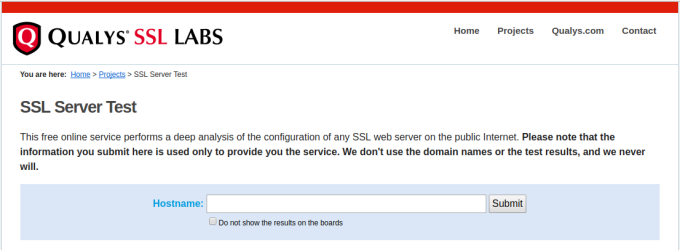
Enter your site’s URL and click Submit. After a minute or two, you’ll get output like this:
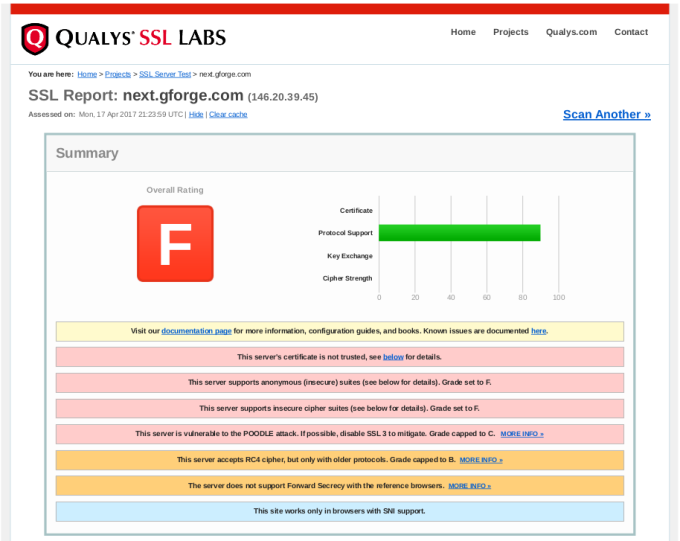
In the report details, you will find explanations of anything marked as a problem from your server, including how to close security holes that were found.
If your server isn’t on the Internet (i.e., on your internal network), then you’ll need to download and run scanning tools yourself. Here are some popular ones:
- TLS Observatory — An open-source scanner from Mozilla, written in Go. You’ll need the Go runtime to run this on your server or desktop, or you can use the Docker image. Performs scanning for both the SSL/TLS version and cipher suite(s) in use.
- Cipherscan — Another tool from Mozilla, written in Python.
Get With The Times
After running your scans, you’ll need to decide what changes (if any) to make to your SSL configuration. It’s important to understand that choosing the most up-to-date settings will leave out some older clients. Fortunately, Mozilla also has a great online tool to help you balance security with compatibility.

Give this tool your current version of Apache httpd and OpenSSL, and you’ll get various choices for maximum security versus maximum compatibility.
Our Recommended Configuration
In the end, we went with the Modern configuration, but added the AES256-SHA256 cipher back to the list. This allows only TLS 1.2 (the most secure), but adding that one cipher back keeps compatibility with older non-browser clients like curl, so that existing SVN and git over HTTPS are not broken.
Here’s the configuration snippet we recommend for GForge servers:
<VirtualHost *:443>
    ...
    SSLEngine on
    SSLCertificateFile /path/to/signed_certificate_followed_by_intermediate_certs
    SSLCertificateKeyFile /path/to/private/key
    # Uncomment the following directive when using client certificate authentication
    #SSLCACertificateFile /path/to/ca_certs_for_client_authentication

   # HSTS (mod_headers is required) (15768000 seconds = 6 months)
    Header always set Strict-Transport-Security "max-age=15768000"
    ...
</VirtualHost>

# modern configuration, tweak to your needs
SSLProtocol all -SSLv3 -TLSv1 -TLSv1.1
SSLCipherSuite AES256-SHA256:ECDHE-ECDSA-AES256-GCM-SHA384:ECDHE-RSA-AES256-GCM-SHA384:ECDHE-ECDSA-CHACHA20-POLY1305:ECDHE-RSA-CHACHA20-POLY1305:ECDHE-ECDSA-AES128-GCM-SHA256:ECDHE-RSA-AES128-GCM-SHA256:ECDHE-ECDSA-AES256-SHA384:ECDHE-RSA-AES256-SHA384:ECDHE-ECDSA-AES128-SHA256:ECDHE-RSA-AES128-SHA256
SSLHonorCipherOrder on
SSLCompression off
SSLSessionTickets off

# OCSP Stapling, only in httpd 2.3.3 and later
SSLUseStapling on
SSLStaplingResponderTimeout 5
SSLStaplingReturnResponderErrors off
SSLStaplingCache shmcb:/var/run/ocsp(128000)
Signs That You’ve Outgrown Github, Part 3: Merges
This is part 3 in a series about the limitations of Github, and how they might be holding your team back from its full potential. If you want to go back and catch up, here’s Part 1 and Part 2.
Go ahead, I’ll wait right here.
Done? Okay, let’s move on.
Today’s discussion is about getting code merged. It’s one of the most fundamental things any software team has to do. If your team is anything like ours, it’s something you do many times every day. It might even be the kickoff for your Continuous Integration/Delivery process, as it is for us.

Getting things out quickly is important, but preventing outages from bad code is even more important. You probably want an easy way to review and even test code that doesn’t distract too much from the work you’re already doing.
Once again, Github has a wonderful system for promoting code from one repository or branch to another — the Pull Request (PR herein). In particular, the PR is great for open-source projects where people might want to contribute, even if they’re not members of the main project. The proposed contributions can be examined by the main project member(s) and be pulled in only if they’re helpful.

But like many other Github features, you may find the PR process to be mis-aligned to your needs, in a way that creates a little extra delay and a bit of confusion every time you use it.
Pull Requests 101
For those who haven’t tried one yet, a pull request (PR) is a special kind of task, asking someone to merge a set of changes (commits) from one place to another. In more general terms, you can think of it as promoting a chunk of work from one level to another — such as from a development branch to test and then to production, or from a hotfix branch to long-term-support.

Because it’s a request, it doesn’t involve any access to the project repository from any non-members. The project team can review the proposed changes and take them, ask for revisions, or ignore them. It’s a great model for open-source or otherwise loosely-coupled groups to share ideas and improvements.
Keep It In One Place
But that flexibility comes at a cost. Pull Requests are opened and managed separately from individual tasks, so you’re basically creating another task to review each task’s work. The open or closed status of each task can be independent of the status of the related PR. Additionally, there’s nothing stopping someone from submitting changes for multiple tasks in one PR, which can be confusing and difficult to review.
For software teams that aren’t open-source, this loose coupling actually creates more process, more overhead, and time thinking that could be spent doing instead.
Ask yourself — wouldn’t it be a lot easier to merge the code as an integral part of the task itself?
Singularity Of Purpose
Let’s start with an assumption — that in order to change your code, there should be a defined reason for doing so.
You’re writing code because something needs to be added or fixed. There’s a use case. A story. A bug. A feature. A customer who wants something. There’s a reason to change what you already have.
You probably also want to do two things with your tasks:
- You want to create a plan ahead of time, for which things will be done, by whom, in what order.
- You want to keep track of progress as things move along.
Once you start depending on tasks for planning and tracking, you can begin to improve your overall process, reducing the number of steps and the distance between idea and working code. As you do, separate PRs may start to lose their appeal. Asking developers to open a separate kind of ticket to get code merged is a hassle. Allowing them to put multiple bug fixes into one merge is asking for confusion and mistakes.
If you’re delivering code using a well-defined workflow, PRs can actually cause problems:
- Audit trail — It’s difficult (or impossible) to know later which code changes went with which task.
- Larger merges — the code review itself becomes much more complicated, since there are more commits, more changes files.
- All or nothing — If you like the changes for task #1, and for task #2, but there are problems with the tests for task #3, the whole PR is sent back for rework. This means you’re likely sitting on changes for longer.
- More conflicts — Pretty simple math: (Larger merges) + (All or nothing) = More conflicts.
Since there’s no way in Github to limit the content of a PR, there’s no good way to prevent this kind of behavior. Creating a PR for every single bug becomes a tedious time-sink that doesn’t add value to your day.
Now, you might argue that a Github PR can act as the task itself, and it does — but not really. PRs are only retrospective, meaning that you create one after (or while) doing the work. If you don’t create tasks before doing the work, then you’ll never have any way of planning or tracking progress.
Simplify, Simplify
For most teams, the overlap between tasks and PRs is additional work that doesn’t generate any value. What you really need is a way to automatically detect code changes, review those changes and then promote them to dev, test and production, all as part of the task.
This kind of integration means that you can go back to the task later, understand the intent of the change, and also see the code changes that went with it. Your task tracking becomes a source of institutional memory, so that people can move in and out of the team, or across different features without making old mistakes over and over again.
If your tools are preventing you from improving your process, maybe it’s time to improve your tools.
Ready to move beyond GitHub’s limitations? See our GitHub Alternative page for a quick overview of why teams switch, or dive into the full GForge vs GitHub comparison for details. Then try GForge Next — it’s free for up to 5 users.
Signs That You’ve Outgrown Github, Part 2: Task Management
In my last post, I introduced a set of features (and failings) that might have you wondering if Github can grow with your team. In this post, I’m talking about tasks, workflow and keeping things moving.
Github’s Workflow Is Simple And Cool
When you’re starting out, Github’s approach is really helpful. You can create a task with just a summary sentence. If you want, you can add a more detailed description and some labels.
Tasks are open or they’re closed, and you can close a task with a commit. From a developer’s perspective, it’s wonderful to grab a task and write some code, then update the task without having to visit the website. You get to stay in your IDE, your command-line — whatever tools you’re using to do the work.

The Real World Gets Complicated
These features work very well for teams that are just starting out, and for projects that may have somewhat disconnected participants (e.g., open-source projects). But as your team begins to deal with marketing, sales, customers, or even other dev teams, you may rub up against some important limitations.
There’s more to life(cycle) than Open and Closed
Very often, there are other pieces to your workflow than just coding. There could be planning, design, code review, testing, deployment, and other activities. It’s pretty common to reflect some of that workflow in the status, so that everyone can tell where a task is and what needs to be done next, without having to re-read then entire history.

Closing a task just because you’ve committed some code assumes that everything else will go right. Usually, committing code is the beginning of the process, not the end.
Not everything fits in the same box
Not everything is a task to be done in the code. Sometimes, you want a place to flesh out a user story, or discuss the design for a specific page. Maybe you need to track servers, or which customers have which version of your product.

You might be able to jam these different kinds of information into a Github task, but it ends up being a bigger version of the labeling problem from my previous posting.
What’s going on?
Github has some pretty decent release/milestone tools, and you can group tasks into a milestone to track overall completion. That project-level view can be great, but what about planning and tracking your current sprint? Or planning and tracking your own day?
Standups get a lot easier when you can automatically see what the team worked on recently, and when the team can identify what they plan to work on.
What’s really important?
This is one that everyone runs up against pretty quickly. Putting a priority on each task allows the team to keep moving, by knowing which tasks to work next. Without prioritization, everyone’s just guessing about what is most important.
Github has no way to prioritize tasks. Even if you use a label (to beat a dead horse), you won’t be able to sort them.
Plans get tangled up
It’s pretty easy to enter and manage tasks in Github, and depending on your level of detail one task might be completely stand-alone from another. Almost inevitably, though, a task will be blocked, waiting for some other task to finish. Your new web page needs an API update from someone else. A customer’s support ticket might be waiting on a bug that someone is working on. Or a use case can’t be complete until all three web pages are working together.

The ability to manage dependencies has been asked and discussed many times over the years, and Github just doesn’t want to take on the complexity. It doesn’t have to be a Gantt chart, but making sure that everyone knows when tasks are blocked (and when they become unblocked) is key to maintaining project momentum.
A More Realistic Approach
First off, don’t expect Github to change. The simplicity of their task management is perfectly suited for many, MANY projects. It’s easy to get started with, and is a great place for sharing open-source and personal projects.
But maybe your team has started to suffer from that simplicity, and you’re looking for something to fill in the gaps that Github leaves. You might even be tempted to try one of the dozens of “bolt-on” tools that claim to integrate tightly with Github.
Instead, let me suggest that what you really need is something that was built from the ground up to start simple, grow to be comprehensive, and stay elegant. Something that’s easy to use, but allows more complexity as you grow into it.
Here are a few more simple pieces of advice:
- Instead of shying away from adding different status values, be honest about the workflow you want and make the tool serve your needs.
- Consider that maybe you need a different set of fields for tracking use cases or UI designs, versus coding tasks, versus customer support.
- Don’t settle for something that’s too simplistic, or a patchwork of loosely-coupled tools, when working around their limitations will cost you time that’s better spent on your actual mission.
If your tools are preventing you from improving your process, maybe it’s time to improve your tools.
Come back soon for another sign that you might have outgrown Github .
Ready to move beyond GitHub’s limitations? See our GitHub Alternative page for a quick overview of why teams switch, or dive into the full GForge vs GitHub comparison for details. Then try GForge Next — it’s free for up to 5 users.
Signs That You’ve Outgrown Github
Github is WONDERFUL. I have used it for a long time now, and it’s great. It’s easy to get started, and especially for one-person projects, it really helps keep things organized.
But as you start to add team members, competing priorities, and overall complexity, something changes. In lots of little ways, Github starts to show that it just wasn’t designed for long-haul software projects, with many team members and a non-trivial workflow.
Here are some of the things you might already be dealing with:
- You’ve created so many labels that you’ve written a wiki page to tell everyone how to use them (and how NOT to use them!)
- Maybe you want to keep track of bugs and support tickets separately.
- Perhaps you don’t think that developers should be able to close a ticket just by committing code.
- Maybe you’re tired of having to search in Google Docs, Basecamp, Slack and Github to find where you talked about that new feature.
- Could be that you need to manage the relationships between tasks that depend on or block each other.
I’ll do a blog post for each of these topics. This week, let’s start with the first one — labels.
Labels
Labels are quick and easy to use, offer a lot of flexibility and require virtually no setup or configuration overhead. The default labels in Github look something like this:
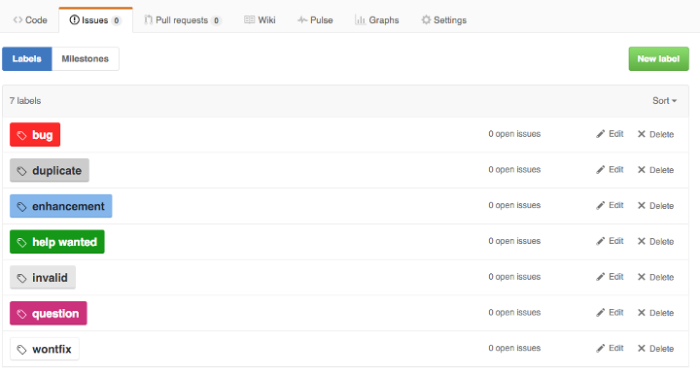
Those are probably fine for 98% of new Github projects. Over time, however, most teams will expand on the list of tags to include different values than the default list, and even different types of data. Adding categories for basics like type, priority, and status makes a lot of sense when you’re managing a backlog. But all of those new values expands the list beyond what you can keep straight in your head.
So, how can teams use complex label sets reliably? One common convention is to use a prefix word to identify the group to which each label belongs (courtesy of Dave Lunny):
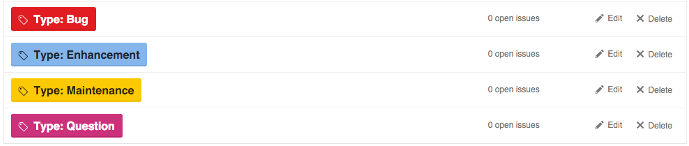

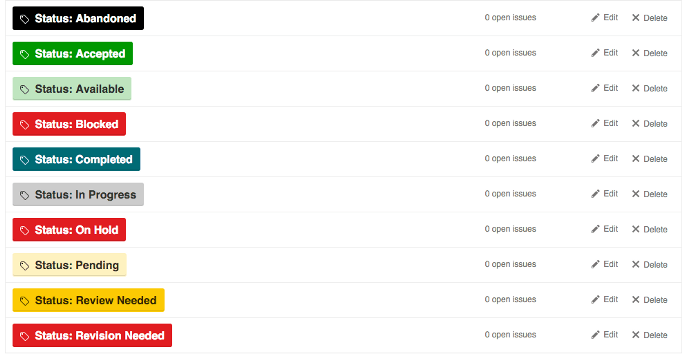
This approach has the benefit of including the type of label as part of the label text, so you won’t be confused between “Status: Test”, “Environment: Test”, and “Task Type: Test”. Visually, the various colors can be used to show differences in the specific values, like production vs non-production, or high priority vs lower priority.
The downside is that when viewed across label types, the different colors are confusing and even downright jarring. Instead of quick visual signals based on color, you actually have to read each label value. It’s bad enough when looking at a single task, but when browsing a list of tasks, it can be a hot mess.
Another approach is to use similar colors for grouping. Here’s an example (from robinpowered.com):
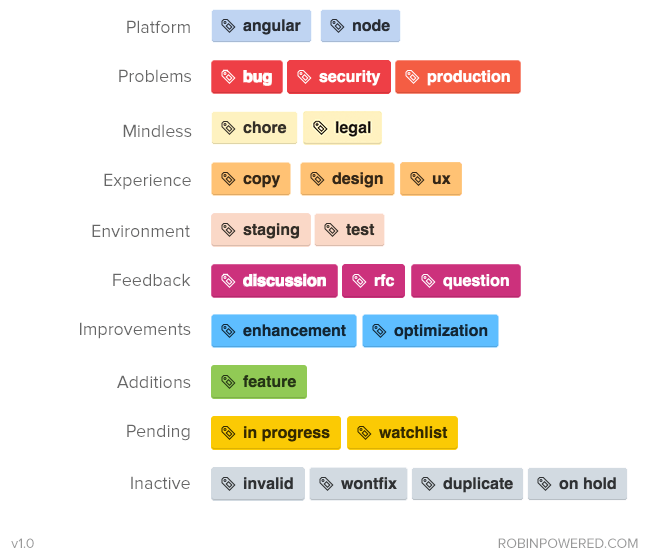
While it’s much easier on the eyes, you no longer have the label type included with the label value. Also, this particular set of labels combines and separates a lot of values in ways you won’t appreciate later — for example, why is the production label in “Problems” and not “Environment”? There’s likely information on a wiki page somewhere, explaining that you don’t choose anything from “Environment” when it’s a production issue, right?
This next example isn’t really an example at all, but a cautionary tale. Imagine walking into your first day with these guys:

This isn’t someone’s drug-addled fantasty project, either — it’s servo, a very active and popular project on Github.
Tools For Your Tools
In response to this widespread need, there are actually tools (like git-labelmaker) dedicated to helping Github users automate the creation and management of complex sets of labels, using different naming conventions, color schemes and labeling styles. Which is very cool — except that it seems like an awful lot of work to go through, doesn’t it? If someone has created a tool to help you use another tool, maybe it’s the wrong tool.
Tag/label functionality was never designed for complex values or workflow.
A Right-Sized Solution
Instead of a mashup of various labels, organized by a prefix word or a color scheme, consider this layout (with a few additions that are, IMO, obvious):

Separating these various concerns also allows you the flexibility to require some fields when a task is created, and wait for the right step in your workflow for others. Instead of manually enforcing your task management process, you can allow your tool to do it for you.
One last benefit — if you’re using separate fields instead of specific tag values, then changing the name of the field or the values over time won’t break old data. The new field name or value(s) will be reflected in older tasks automatically.
If your tools are preventing you from improving your process, maybe it’s time to improve your tools.
Come back soon for another sign that you might have outgrown Github — next time, we’ll talk about Github’s one-dimensional task tracking.
Ready to move beyond GitHub’s limitations? See our GitHub Alternative page for a quick overview of why teams switch, or dive into the full GForge vs GitHub comparison for details. Then try GForge Next — it’s free for up to 5 users.