Last week we showed you how GForge reviews pull requests before we do — a prompt attached to a workflow transition, firing the moment a ticket crosses it. That’s one of three things the same underlying system can do. This week we’re showing you the other two — and proving one of them end-to-end: a real merge, a real webhook delivery, and a real Jenkins build, traced all the way through.
One system, three actions
Every real event in GForge — a merge, a ticket transition, a new release, a wiki edit — can trigger a subscription. The event catalog spans seven categories: Issue Tracker, Source Code, File Releases, Forum, Documents, Build, and Account. Pick a specific event, an entity-level wildcard, or a whole category, and point it at one of three actions:
- ✓ Webhook — an HTTP call to a URL you control, with placeholder tokens substituted from the event payload.
- ✓ Email — the same event, sent as an email instead, with its own subject and body templates.
- ✓ LLM — a prompt template, run through your project’s Flow AI configuration. This is the exact mechanism behind last week’s automatic code review.
Same subscription system underneath all three. You’re not learning three features — you’re learning one, with three places to point it.
Setting one up
From a project’s Admin bar, open the Webhook Subscriptions tab and create a new subscription: a name, a status, an event pattern, an action, a retention period, and a retry policy. Here’s a real one, pulled directly from our own production instance:
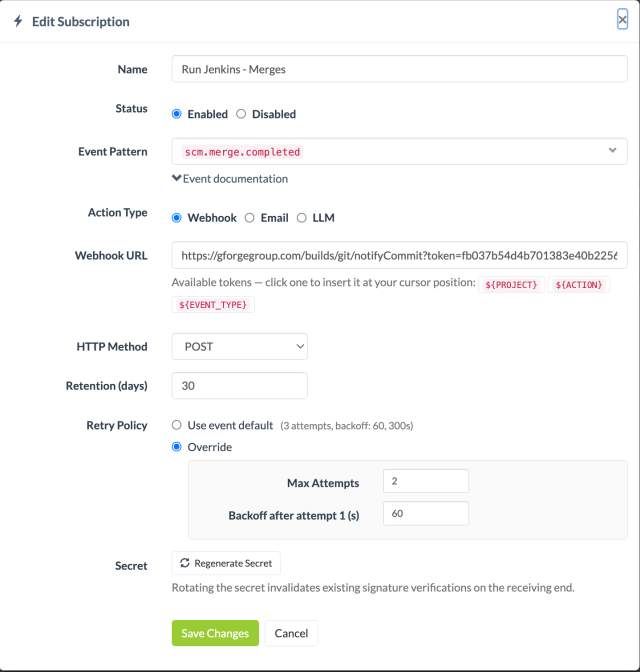
A real, currently-active subscription on our own GForge instance.
Every field here is real
The event pattern (scm.merge.completed), its default retry policy (3 attempts, backoff 60/300s), and its placeholder tokens (${PROJECT}, ${ACTION}, ${EVENT_TYPE}) are exactly what this event ships with — nothing hand-tuned for this screenshot.
Creating a webhook subscription shows a one-time HMAC secret in a green panel. Copy it immediately — GForge signs every delivery with it (X-GForge-Signature: sha256=<hex>), and it’s never shown again.
A real example: merge → webhook → Jenkins build
We didn’t just configure this and assume it works. We traced one real event through the entire chain, start to finish.
A branch merged into our own gforge-next repository this week — work from ticket #65909, merging next/flow-step-count-#65909 into gforge-next. That merge fired our scm.merge.completed subscription, which POSTs straight to Jenkins’ own notifyCommit endpoint — no polling, no cron job watching for changes.

The delivery log: a clean 200, with the exact payload GForge sent.
Delivery: success
Every delivery — success or failure — is logged with its response code, timing, and the exact envelope sent. This one shows sha: "cc597bb469a1c1847dcbbb3ae5484ebf98e47f93" — the commit this merge produced.

Jenkins’ own record of what it built — not our word for it.
And on the Jenkins side
Build #586 of GForge-Next-Pipeline started seconds after that delivery. Its Git Build Data page shows Revision: cc597bb469a1c1847dcbbb3ae5484ebf98e47f93 — a byte-for-byte match to the SHA in the delivery above. Not a plausible-looking example — the actual commit, confirmed on both ends.
(If you’re also using GForge’s Jenkins plugin, the build result shows back up on the ticket automatically — learn more about the Jenkins plugin.)
Verifying and debugging deliveries
The Delivery Log is the source of truth for every subscription — sortable and filterable by subscription, event type, status, or date. A 2xx response ends retries immediately; a 4xx is treated as a permanent failure (fix the URL or auth, and the next new event tries fresh); a 5xx or timeout retries on the subscription’s own backoff schedule. Click any row for the full response and the exact payload envelope — it’s the first place to look when an integration isn’t behaving.
The same system, pointed at a prompt
Everything above used the Webhook action. GForge has more than one way to wire an LLM into your process, though — last week’s post covered attaching a prompt directly to a tracker workflow transition, a separate, narrower mechanism built just for that. This event subscription system’s own LLM action is a more general option: the same event catalog as the Webhook and Email actions above, just pointed at a prompt instead of a URL or an inbox.
Two things worth repeating every time we talk about AI in GForge: every AI integration is opt-in and off by default — nothing is enabled until you or your admin turns it on, per project. And GForge doesn’t build or operate its own AI model, so there’s nothing for your data to train — when you connect a third-party LLM provider, that provider’s own data and training policy governs what happens to what you send it, not GForge’s. Read the full breakdown →
Got a system you’d want GForge notifying the moment something happens? Tell us what you’d build — we might feature it in a future post.
Where to go from here
Everything in this post is real: a real subscription, a real delivery, a real Jenkins build, confirmed on both ends. If you want to read up on webhooks at your own pace, the full docs are here: Project-Admin-Webhooks. And if you’d rather see it live, book 45 minutes with our team and we’ll walk through whatever’s most relevant to you.