A wiki that’s part of the work, not a separate tool for it.
Most wikis are where documentation goes to get stale. GForge’s pages can pull in live tracker queries, burndown charts, and build status — so a status page updates itself instead of someone remembering to edit it.
Turn any page into a living dashboard
Six macros embed real, live GForge data directly into a page — a saved tracker query’s results, a sprint burndown, build status, project activity. Not a snapshot: every time the page loads, the data is current.

One real wiki page, three live macros: an activity trend, a sprint burndown, and 17 real tickets pulled live from a saved query.
A tracker query embedded this way is the same saved query you’d use anywhere else on the site — build it once in Tracker Item Browse, drop its URL into the page, and every ticket in it updates in place as the underlying data changes. No copy-pasting a status update into a doc and hoping someone remembers to do it again next week.
Beyond the one query-embed most wiki tools offer, there’s a burndown chart, build status, tracker summaries, and activity feeds — six distinct macro types, not one.
Built for people who already think in diagrams and code

A real Mermaid flowchart, rendered live — no export/import, no separate diagramming tool.
Paste a fenced ```mermaid block and it renders as an actual diagram, not a code snippet — flowcharts, sequence diagrams, the works. Math renders the same way: wrap an expression in $ or $$ and KaTeX typesets it properly, not as plain text with dollar signs around it.

Real math, typeset properly — inline and block form.
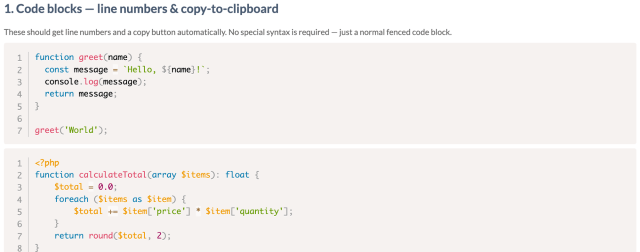
Every language, syntax-highlighted, with line numbers and a copy button — no special syntax required.
Never wonder if a page still points anywhere

A real search for “Podman” — every result matched on page content, not the title (none of these titles even say Podman).
Full-text search reaches page content, attachment file contents, and tags — not just titles. And because GForge tracks which pages link to which, deleting a page that others depend on doesn’t happen silently: it flags what would be orphaned first, backed by a real link-validation report for admins, so broken links don’t quietly pile up.
Your own space, built on the same engine
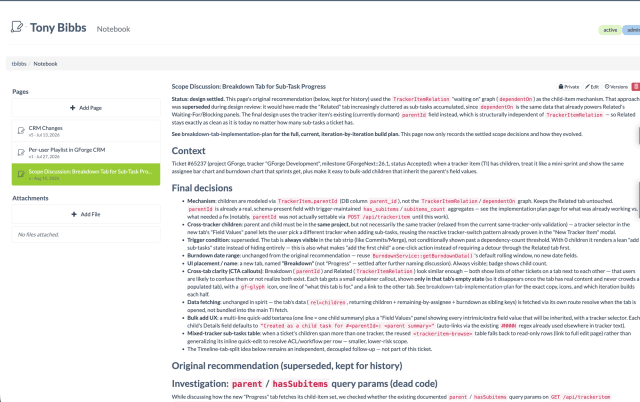
A real personal Notebook page — versioned, private by default, with a per-page option to share it publicly.
Every user gets their own set of wiki pages, reached from their account menu — same editor, same versioning, same Mermaid and KaTeX support as the project wiki. It’s private by default, but any single page can be flipped public with its own shareable link, without exposing the rest.
It’s the same underlying engine behind the ticket Notebook covered on Ticketing — just scoped to a person instead of a ticket.
A wiki you can script, not just browse
From the command line: gforge wiki mirror turns a wiki subtree into a static HTML or Markdown site — publish it, archive it, or serve it somewhere GForge itself doesn’t run. gforge wiki bad-links audits a project’s wiki for broken internal links, so link rot is something a CI job catches, not something a person stumbles into.
Point an AI assistant at the wiki via GForge CLI + MCP and it can make surgical edits — a patch_wiki_page tool does targeted find-and-replace instead of overwriting a whole page, and a write-docs-from-ti prompt drafts documentation directly from a finished ticket, no blank page to start from. See AI at GForge and GForge CLI + MCP for more.
One project, or many
Every project gets its own wiki, and it stays that way — GForge doesn’t have a separate concept for organizing documentation by team or department across projects.
What it does have: an Org is just a project that other projects sit under, and an Org Admin’s access reaches everything beneath it. That’s a permission structure, not a content-organization feature — each project’s wiki stays its own separate space either way.
The fundamentals, done right
Full Version History
See a diff between any two versions of a page, and restore an older one in one click — nothing is ever really gone.
“What Links Here”
A real backlink graph — know what points to a page before you touch it, not after something breaks.
Attachments, Even Before You’ve Saved
Drag a file onto a brand-new page before it’s ever been saved — it’s staged and attaches automatically the moment you do.
See documentation that stays current on its own.
Start free, or talk to an engineer about migrating your existing wiki over.