Best Confluence Alternative for 2026
Tired of juggling Confluence, Jira, Bitbucket, and Bamboo?
There’s a simpler way.
Why Teams Look for Confluence Alternatives
Atlassian built an empire by selling you one tool at a time. First Confluence for docs. Then Jira for issues. Bitbucket for code. Bamboo for CI/CD. Crowd for SSO.
Before you know it, you’re managing six products, six bills, six upgrade cycles — and in 2024 Atlassian ended Server licenses entirely, forcing you to pay Data Center prices or move to their cloud.
If you’re here, you probably already know the frustrations:
- Server license sunset — Atlassian killed on-premise Confluence Server. Your options: expensive Data Center or move to their cloud.
- Cost multiplication — You’re paying per-user for each product. Add a plugin? Pay per-user again.
- Tool sprawl — Your “integrated” stack is actually six separate products duct-taped together.
- Admin overhead — Someone has to manage permissions, workflows, and upgrades across all these tools.
- Air-gapped requirements — Government, defense, healthcare, and finance often can’t use cloud-hosted documentation tools at all.
When Atlassian killed Server licensing we had to choose between paying 4x more for Data Center or finding something else. GForge’s wiki does everything we needed Confluence for.
We were paying for Jira, Confluence, and Bitbucket separately. GForge replaced all three. The wiki isn’t as flashy as Confluence but it’s solid and our team actually uses it.
Our security requirements meant Confluence Cloud was never on the table. We needed documentation we could run fully on-premise, inside our network perimeter.
Confluence administration was a part-time job. GForge’s wiki just works — pages, hierarchies, search, version history. No plugins, no maintenance windows.
Same capabilities. One platform. One bill. 76% less cost.
What You’re Really Paying For
Confluence’s pricing looks reasonable — until you add up what a complete DevOps stack actually costs. Here’s what a 30-user team pays annually:
| What You Need | Atlassian Product | Annual Cost |
|---|---|---|
| Wiki & Documentation | Confluence | $1,800 |
| Issue Tracking & PM | Jira | $6,116 |
| Service Desk | Jira Service Management | $6,300 |
| Git Repositories | Bitbucket | $1,800 |
| CI/CD Pipelines | Bamboo | $1,100 |
| SSO/Enterprise Auth | Crowd | $300 |
| Atlassian Total | $17,416+ | |
| GForge (all features included) | $2,160 | |
That’s over $15,000/year in savings — and you get a simpler, unified platform.
What to Look for in a Confluence Alternative
Not every alternative solves the real problem. Some just replace one piece of the puzzle. Here’s what actually matters.
True Unification
Not “integrations” — one platform. Wiki, issues, code, CI/CD, and chat built together from day one. No plugins required.
On-Premise Option
Atlassian killed server licenses. If you need to keep data in-house for security, compliance, or sovereignty — including air-gapped networks — your alternative must support self-hosting.
Predictable Pricing
One price for everything. No per-product charges, no plugin taxes, no Data Center price jumps. Know what you’ll pay this year and next.
Migration Support
Moving from Confluence is daunting. Your alternative should help you migrate pages, Jira issues, and Bitbucket repos — not leave you on your own.
Simple Administration
One admin console, one set of permissions, one upgrade process. Not six different Atlassian products to manage.
Human Support
When something goes wrong, you should talk to engineers — not navigate a ticket queue hoping for a response.
One Platform to Replace Confluence and the Entire Atlassian Stack
GForge was built for teams that need serious documentation and DevOps without the complexity tax. Everything Atlassian spreads across six products, we deliver in one.
Replaces Your Entire Stack
- Confluence → Built-in wiki with version history, search, and access controls
- Jira → Issue tracking with full Agile support (Scrum and Kanban)
- Bitbucket → Git and Subversion with code reviews and pull requests
- Bamboo → Integrated CI/CD pipelines
- Jira Service Management → Service desk included
- Crowd → SSO/SAML built in
- Plus: Team chat and centralized search across everything
How It’s Different
- $6/user/month — all features, no tiers, no surprises
- First 5 users free — try it with your team before you pay
- Deploy anywhere — SaaS, on-premise, or air-gapped
- One-minute install — Docker or Podman, runs anywhere
- Migration help — we’ll move your Confluence, Jira, and Bitbucket data
- Human support — talk to engineers, not ticket queues
Ready to Escape the Confluence Tax?
Diagrams, Math, and Code — Not Just Attachments
A wiki for a software team should speak the same language the team already does. Confluence users often reach for Gliffy or draw.io as a separate integration for diagrams — GForge renders them natively, from text, right in the page.

A real Mermaid flowchart, rendered live — no export/import, no separate diagramming tool.
Fenced code, rendered as a real diagram
Paste a fenced ```mermaid block and it renders as an actual diagram — flowcharts, sequence diagrams, the works. Math renders the same way: wrap an expression in $ or $$ and KaTeX typesets it properly, not as plain text with dollar signs around it.

Real math, typeset properly — inline and block form.
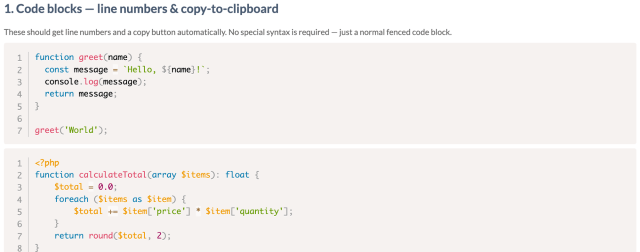
Every language, syntax-highlighted, with line numbers and a copy button — no special syntax required.
Live Data, and a Wiki That Lives on the Ticket

One real wiki page, three live macros: an activity trend, a sprint burndown, and 17 real tickets pulled live from a saved query.
Six macros, not zero
It’s not Confluence’s plugin marketplace — but a tracker query, a sprint burndown, build status, and project activity are among six macro types that embed real, live GForge data directly into a page. Not a snapshot: every time the page loads, the data is current.
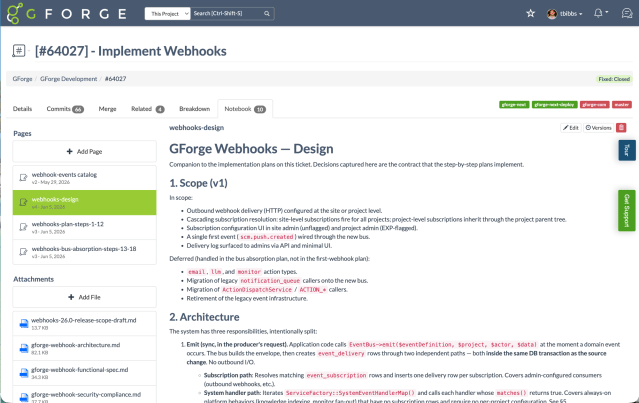
A real design doc — Scope, Architecture, code-level detail — written directly on the ticket, not a separate wiki.
A wiki that lives on the ticket itself
Confluence pages can link to a Jira issue, but they’re still two separate objects in two separate systems you have to remember to connect. GForge’s Notebook is different — a real, versioned, multi-page wiki space that lives directly on the ticket. Write the design doc, the architecture notes, the technical analysis right where the work is happening.
For teams replacing the Jira + Confluence combination specifically, this is often the biggest workflow change: the thinking never has to leave the ticket. See Notebook in full on Ticketing →
Who GForge Is For
GForge works best for:
- Teams migrating off Confluence Server — Atlassian ended Server support; Data Center pricing is significantly higher. GForge is a full replacement at $6/user/month.
- Organizations that need on-premise deployment — Defense, aerospace, government, finance, healthcare. Many of these teams are also evaluating GForge as a self-hosted GitLab alternative alongside replacing Confluence.
- Teams already using the full Atlassian stack — Consolidate Confluence, Jira, and Bitbucket into one GForge platform
- Companies watching costs — You need enterprise features without Data Center pricing
- Organizations with procurement constraints — Our enterprise licensing eliminates re-procurement friction
Who GForge Is NOT For
We believe in being honest. GForge might not be the right choice if:
- You’re deeply invested in Atlassian integrations — If your entire organization runs on Atlassian with custom integrations and workflows everywhere, optimizing what you have might be more practical.
- You rely heavily on Confluence’s plugin marketplace — GForge has its own live macros (see above), but it’s not a general plugin ecosystem. Highly plugin-dependent pages need a real look before switching.
- You need drag-and-drop diagramming — GForge renders Mermaid diagrams from text, which is fast for developers but isn’t a GUI editor like Gliffy or draw.io. If non-technical stakeholders need to drag boxes around visually, that’s a real gap.
- You’re a solo developer — GForge shines for teams. Solo devs might find free tiers of simpler tools sufficient.
Ready to Try GForge?
Start Free
Create an account on our cloud platform. First 5 users are free, forever. No credit card required.
Create Free Account →Download & Self-Host
Download the installer and run GForge on your own infrastructure. Docker or Podman, installs in about a minute.
Download GForge →Talk to Us
Have questions? Want a demo? Need help with migration from Confluence? Schedule a call with our team.
Schedule a Demo →Frequently Asked Questions
Can you migrate our data from Confluence?
Does GForge wiki support Confluence macros?
How long does setup take?
Do you offer on-premise deployment?
What about support?
Is there a free tier?
What is the best self-hosted Confluence alternative in 2026?
What happened to Confluence Server? What are my options?
Is there a Confluence alternative that works in air-gapped networks?
What is the cheapest Confluence alternative for large teams?


Related Pages
GForge vs Atlassian
Detailed feature-by-feature comparison of GForge and the Atlassian stack.
View Full Comparison →White Paper
GForge vs Atlassian: 20-page comparison covering architecture, pricing, migration, and trade-offs.
Download PDF →Jira Alternative
Specifically looking to replace Jira? See why teams switch to GForge.
Jira Alternative →GitLab Alternative
Need self-hosted Git, CI/CD, and issue tracking without GitLab’s hardware overhead?
GitLab Alternative →