Discussions Page
Page Overview
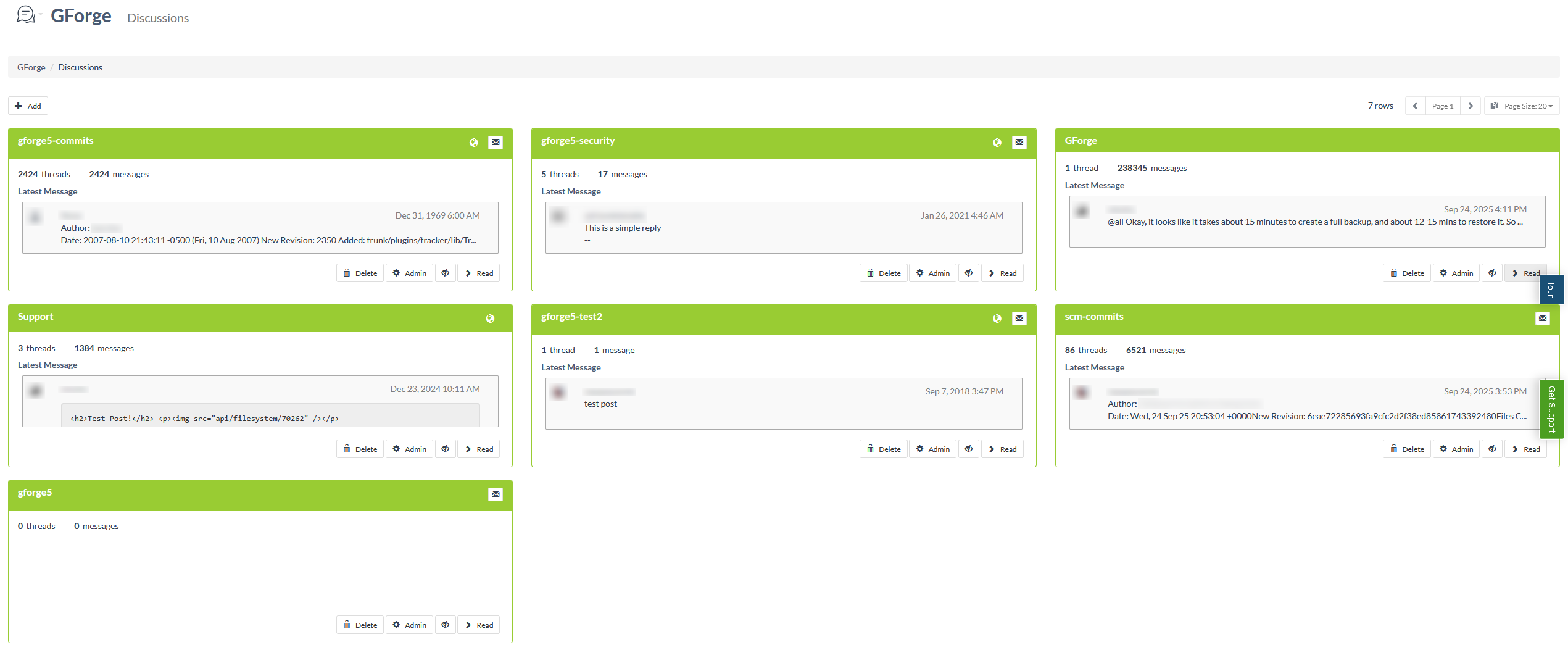
The Discussions page serves as a forum management interface within a GForge project, displaying all available discussion forums organized in a card-based layout. This page allows project members and administrators to view, manage, and navigate between different discussion forums that have been created for the project. Each forum is presented as a summary card showing key information including thread counts, message counts, latest activity, and administrative controls.
The page displays forums in a responsive grid layout, with each forum card containing essential information such as the forum name, visibility status (public or private), thread and message statistics, and the most recent message preview. Users can quickly assess forum activity levels and access specific forums for detailed discussions. The interface includes pagination controls when there are many forums, and provides administrative functions like forum creation, deletion, and configuration for users with appropriate permissions.
Administrative users can perform various management tasks directly from this view, including monitoring forum activity, configuring forum settings, and managing forum permissions. The page also includes email integration features, allowing users to participate in discussions via email where configured. This centralized forum overview enables efficient project communication management and helps team members stay informed about ongoing discussions across different project topics.
UI Elements
Project Navigation Dropdown – Located in the top-left area, this dropdown button with a chat icon provides access to various project sections including Plan/Track, DevOps, Knowledge, Trackers, and Admin areas.
Page Header – Displays "Project Name Discussions" as the main heading, with "Discussions" shown as a subtitle.
Breadcrumb Navigation – Located below the header, showing the navigation path "Project Name > Discussions".
Add Button – Positioned in the top-left of the content area, this button with a plus icon allows users to create new discussion forums.
Pagination Controls – Located in the top-right area, showing page navigation with previous/next buttons, current page indicator, and page size selector dropdown.
Row Count Display – Shows "7 rows" indicating the total number of forums, positioned in the top-right area.
Forum Summary Cards – The main content area contains a grid of forum cards, each displaying:
- Forum title in the card header
- Public/private visibility indicator (globe icon for public forums)
- Email integration button (envelope icon) when available
- Thread and message count statistics
- Latest message preview with user avatar, username, timestamp, and message excerpt
- Action buttons at the bottom: Delete, Admin, Monitor (eye icon), and Read (right arrow)
Forum Cards Layout – Forums are arranged in a responsive grid with cards of equal height (265px), showing forums like "gforge5-commits", "gforge5-security", "GForge", "Support", "gforge5-test2", "scm-commits", and "gforge5".
Monitor Buttons – Each forum card includes a monitor toggle button that allows users to subscribe to or unsubscribe from forum notifications.
User Avatars – Small circular profile images appear next to usernames in the latest message previews within each forum card.