Project Admin: Organizations Page
Page Overview
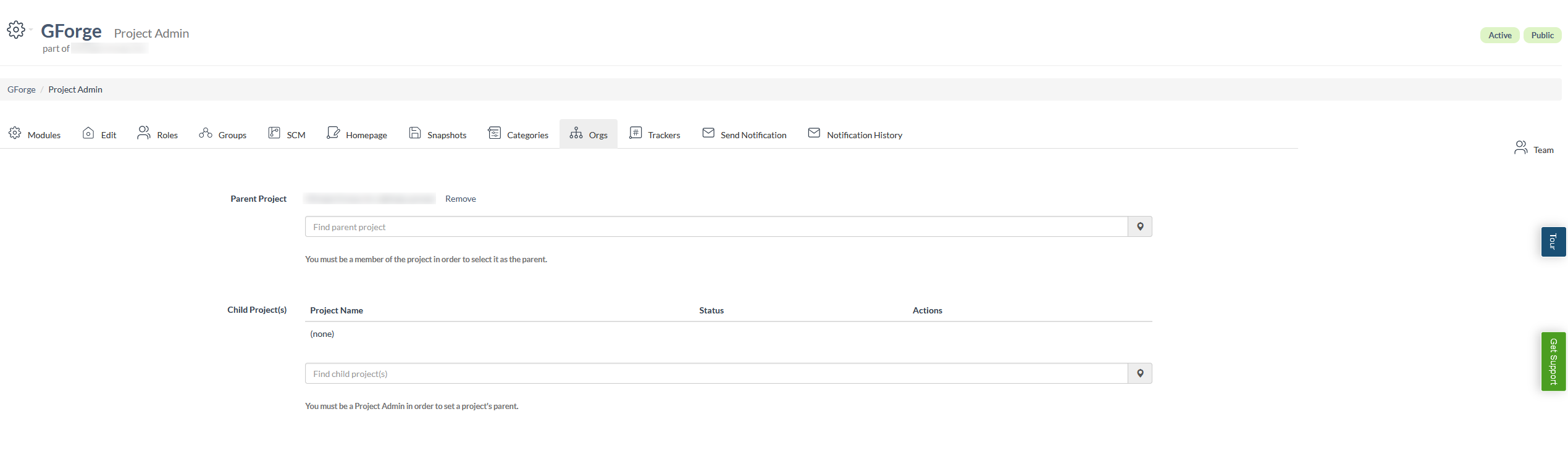
This is the Project Admin page for a GForge project, specifically focused on the Organizations tab. This page allows project administrators to manage the hierarchical organizational structure of their project by defining parent and child project relationships. Organizations in GForge are essentially projects that can contain sub-projects, creating a tree-like structure that reflects real-world organizational hierarchies.
The page is divided into two main sections: Parent Project management and Child Project(s) management. In the Parent Project section, administrators can view the current parent organization and either remove the existing relationship or search for a new parent project to establish a hierarchical connection. The Child Project(s) section displays any projects that are currently designated as children of this project and provides functionality to add new child projects.
The interface includes search functionality with dropdown menus for finding and selecting projects, along with helpful text explaining the permissions required for different operations. Users must be members of a project to select it as a parent, and must have Project Admin privileges to set a project's parent relationship. The page maintains the standard GForge navigation structure with breadcrumbs, project status indicators, and a comprehensive tab-based administration interface.
UI Elements
Project Header Area (Top of page)
- Settings dropdown button: Located in the upper left, contains a gear icon and provides access to project navigation menu
- Project name "GForge": Main heading displaying the current project name
- "Project Admin" subtitle: Small text beneath project name indicating current section
- Status badges: Located in upper right showing "Active" and "Public" project status
- Parent project link: Small text below project name showing "part of GForge Group, Inc."
Breadcrumb Navigation (Below header)
- Breadcrumb trail: Shows "GForge > Project Admin" navigation path
Tab Navigation (Middle of page)
- Modules tab: First tab with settings icon
- Edit tab: Tab with project icon for project editing
- Roles tab: Tab with team icon for role management
- Groups tab: Tab with group icon for group management
- SCM tab: Tab with commit icon for source code management
- Homepage tab: Tab with wiki icon for homepage settings
- Snapshots tab: Tab with snapshot icon
- Categories tab: Tab with project icon for category management
- Orgs tab: Currently active tab with organization icon
- Trackers tab: Tab with ticket icon for tracker management
- Send Notification tab: Tab with mail icon
- Notification History tab: Tab with mail icon
- Team button: Located on the right side with team icon
Parent Project Section (Main content area)
- "Parent Project" label: Section heading on the left
- Current parent display: Shows "GForge Group, Inc. (gforge_group)" as current parent
- Remove link: Link to remove current parent relationship
- Parent project search field: Input field with placeholder "Find parent project"
- Search icon: Map marker icon in input field addon
- Help text: Explanatory text about membership requirements
Child Project(s) Section (Lower content area)
- "Child Project(s)" label: Section heading
- Projects table: Table with columns for Project Name, Status, and Actions
- "(none)" entry: Table row indicating no child projects exist
- Child project search field: Input field with placeholder "Find child project(s)"
- Search icon: Map marker icon in input field addon
- Help text: Explanatory text about Project Admin requirements